



Digital video dessert aka explainer video


An explainer video has a practical purpose: to explain an idea or product, or show how something works. It can help introduce a company or build on its core message. People call it different things — explainer, explanatory video, animated explainer — and the approach depends on what needs explaining.
It’s a kind of digital marketing dessert: it delivers the message of your brand, product or service short and sweet. You can use it on your homepage, a product page or social media, to explain something to existing customers or to win new ones.
A good explainer makes your mouth water and makes you want to share it. But to get there, a few things need keeping in mind.
How long should it be?
As every cook knows, a tasty dish may be eaten quickly but takes time to prepare. An explainer’s length follows its subject, audience and setting: short enough to stay focused, long enough to answer the question the viewer came with.
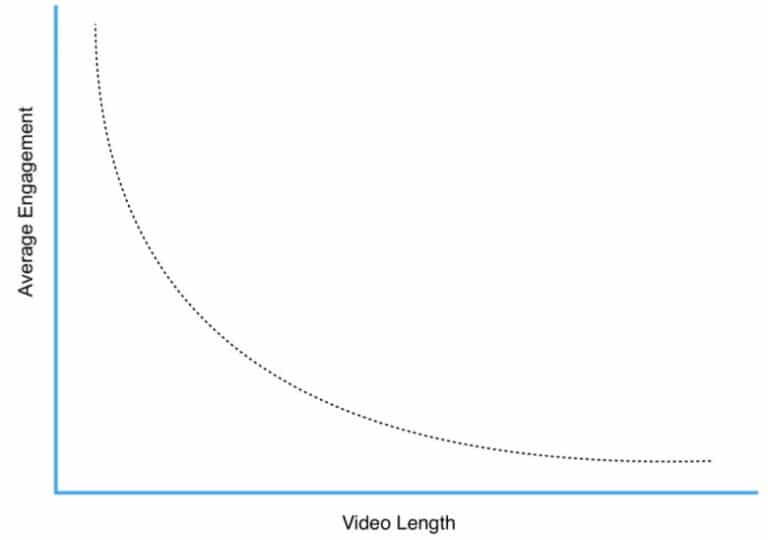
Viewing analyses such as Wistia’s guide can inform planning. Averages are not a recipe for every film: a technical demonstration and a social clip have different jobs.
This chart is a historical example from the original article; an average does not determine the ideal length for every video.
On a homepage, a viewer may be meeting the product for the first time; in a tutorial, they may already be looking for a solution to a specific problem. Before editing, decide which question the video answers and how much room the images and voice need. If one message opens up five more, you may have the ingredients for several desserts rather than one overcrowded plate.
The script
A good script is the precondition for a good explainer, and like a recipe it already holds every ingredient on paper. The topic deserves a post of its own, so here we’ll stress two things: WHAT you want to say and HOW you want to say it.

WHAT? It sounds obvious, which is exactly why it’s easy to overlook. Of course your product can do everything and has a thousand and one benefits. Not only will it solve all your users’ problems, it’ll make them a tiramisu and do the washing-up. And that’s the trap: with too much information, the point gets lost. Focus on what matters and ask yourself what you want to say. Make it one thing. What’s new about your product or service? What do you want people to see, hear and remember?
HOW? To keep the script short and clear, write short, clear sentences. Make them speak in pictures and be visually striking. Humour is often why an explainer catches our eye. But careful: humour is like sugar — too much and you ruin the cake (and your teeth).
The kinds of explainer video
Does your brand need the freshness of whiteboard? The colour of 2D animation? The richness of 3D? Or would you rather go live action? Each has pros and cons, and three questions help you choose: what’s the budget (some techniques cost more than others), what’s the video’s main goal, and who are you talking to.
Whiteboard: scenes that draw themselves. A hand, a little like the one from the Addams family, can draw an idea on a white surface as it unfolds. It became so widespread that some examples can be hard to tell apart: you might say inflation ate into its value. Whiteboard describes a look; the sequence can be filmed or made digitally. Its cost and complexity depend on the script and scope.
2D animation: drawings in motion. With 2D animation, imagination can run wild! A unicorn slides down a rainbow from a candyfloss cloud into a pool of sticky porridge. It is in a sticky situation, but how did it get there? We have no idea. 2D can use characters or graphic elements; its look and method follow the story.
3D animation: depth and a look inside. Want to show how deep that porridge is? 3D makes it possible to build a space and explore it from different angles. It can also show the inside of a device; the work depends on the models, animation, lighting and delivery.
Live action: the real thing. Filming people, products or places can show how something is used and the context around it. Footage can also be combined with graphics and animation; the story determines the production scope.
Which technique to choose?
There is no single solution for every project. Start with what needs explaining, who it is for and where it will be shown. For possible illustration looks, see drawing styles.
A product page may need to show someone using the product; an explanation of a device may need to reveal a part hidden from view. A drawn character can give a story warmth, while graphics without a character may explain a sequence of steps more clearly.
The call to action
A call to action can be the sugar saved for the end. If a video is meant to prompt a next step, the link or invitation should be clear and suited to the audience. An educational video can also simply end by answering its question.
Related reading

What can we do for you?
Your privacy choices
Choose whether to allow YouTube/Vimeo videos and Google Analytics. Both are optional. You can change your choices at any time.
How your choices work
YouTube and Vimeo videos load only if you allow external media. Their providers then receive your IP address and browser information and may use cookies. You can use the website and contact us without allowing them.
With your separate permission, Google Analytics measures visits and successful form submissions. Google receives technical visit information and, for known campaign links, the source, medium and campaign label. Advertising measurement and Meta Pixel are inactive. We remember your choices for 180 days; you can change or withdraw them at any time.